Wednesday, May 14, 2014

Best AnyDVD Alternative to Copy DVD Movies on Windows/Mac

Slysoft's AnyDVD is a famous tool to remove restrictions and regions code from DVDs when the disc is inserted into the drive, allowing you to backup your DVD movies with a DVD copy program. But its operation is relatively cumbersome, not easy to learn, especially for people who are not too familiar with computer operation, or as the first use of such conversion software. Therefore, in order to complete to copy DVD / Blu-ray to hard drive on your computer conveniently, you need to replace the software. Obviously, we want the software is better than AnyDVD in various aspects. 

The alternative satisfying such conditions is Pavtube ByteCopy. It also offer the Mac version-Pavtube ByteCopy for Mac. It is unique product of pavtube, there is no product can replace it in the market, it is not only convenient to copy and backup DVD to your computer hard drive, but Blu-ray disc is also possible. It also can meet the needs of our multi-track with giving us with lossless Multi-track MKV video. 

Tip: If you want to rip DVD movie to video files so that you can play them on your iPhone, iPad, iPod, Android tablet, etc., you can turn to Pavtube ByteCopy. It can convert DVD/Blu-ray to any formats for various devices like Samsung, Apple and so on. Its greatest feature is that can convert DVD/Blu-ray to MKV, MP4 and MOV with Multi-track audio track & subtitles. 

How to decrypt DVD movies and copy them 

System Requirements 

For Windows users 
  • Processor: Intel or AMD Dual core CPU, 1.6 MHz at least 
  • Operating System: Windows 2003/XP/Vista/Windows 7/Windows 8/Windows 8.1 
  • Memory: 512MB or above 
  • Display resolution: 1024 x 768 or above 
  • Optical Drive: DVD drive/ BD drive(BD drive is required for ripping Blu-ray disc)
For Mac users 
  • 1G Hz or above Intel processor. 
  • Snow Leopard (10.6), Lion (10.7), Mountain Lion (10.8), Mavericks (10.9) 
  • 1GB physical RAM (memory) or above. 
  • 1024*768 or higher resolution display. 
  • Optical Drive: DVD drive(BD drive is required for ripping Blu-ray disc)
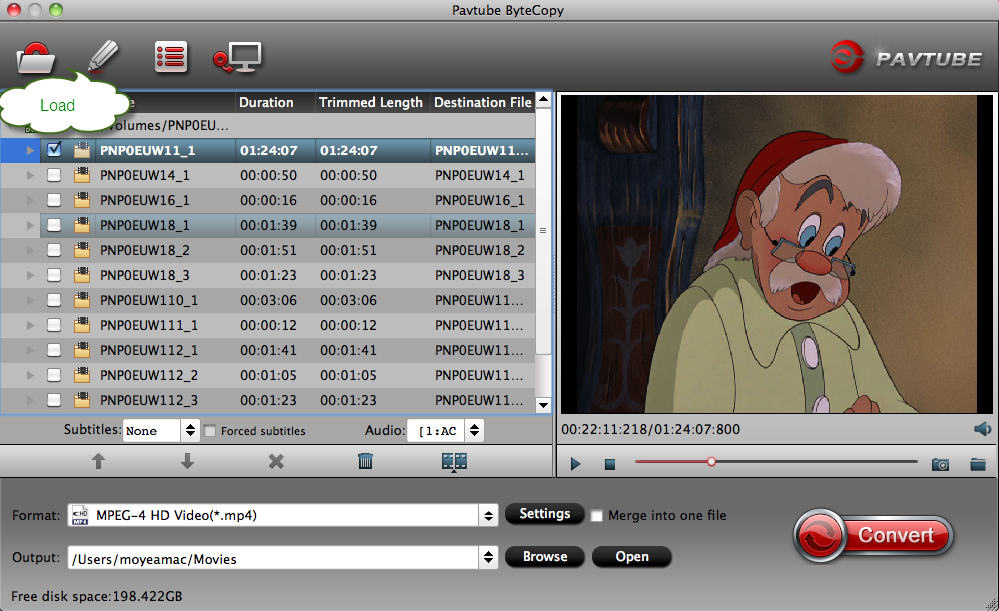
Step 1: Choose source DVD. Insert the DVD disc into your computer's DVD drive and launch DVD Copy. Then click "Files" and choose "Load from disc" to locate your source DVD movies. 

Step 2: Choose the way of copy. Pavtube offers three different backup methods, introduce the following eleven 
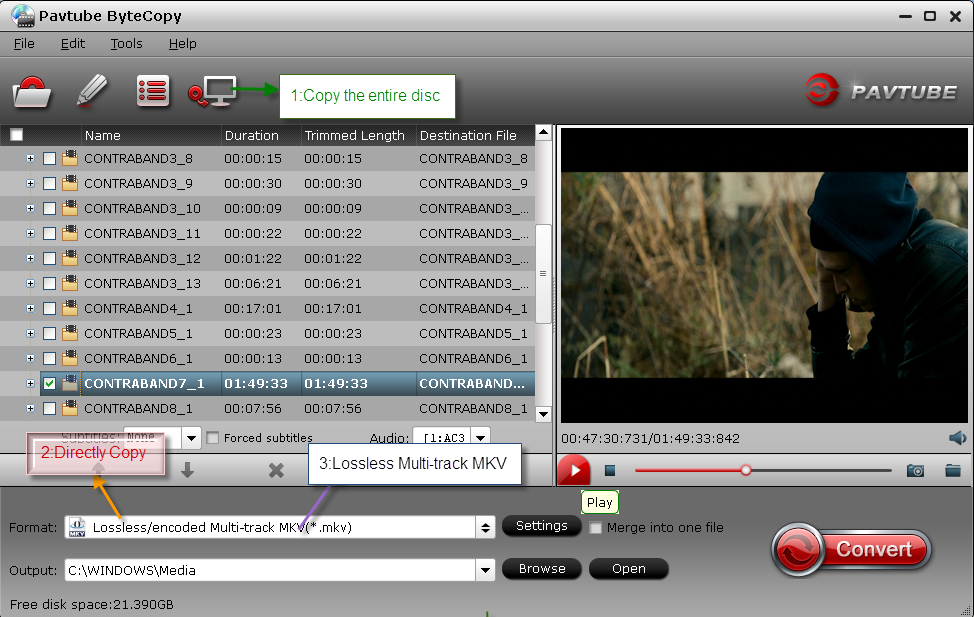


1: Copy the entire disc: Click on "the small computer logo" to complete this operation. This way can save the same DVD of source DVD with original structure. 

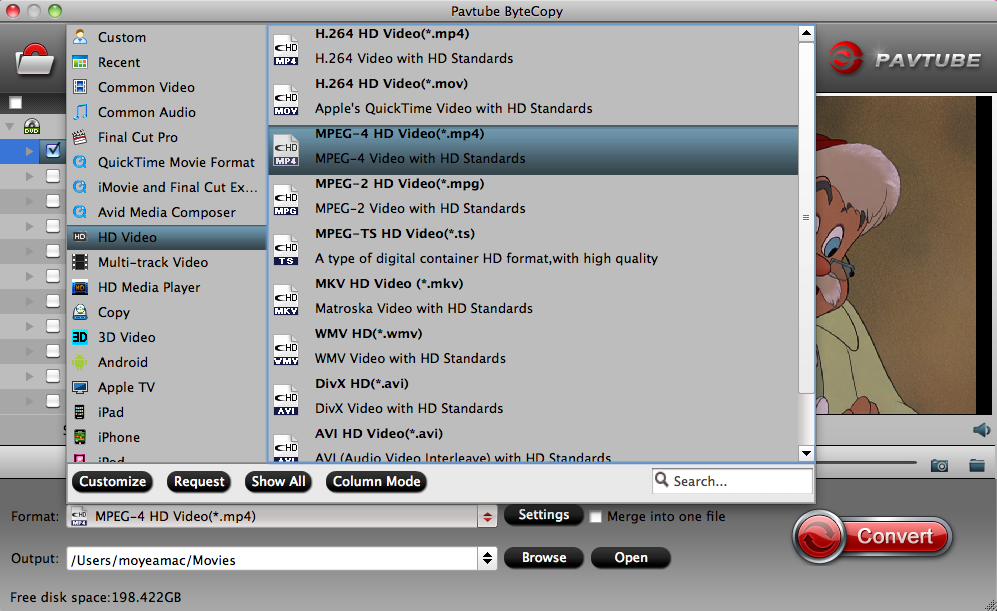
2: Directly Copy: Move the mouse to the format drop-down box, select "Copy > Directly Copy". Directly Copy main movie from BD/DVD discs and leave out extras. 

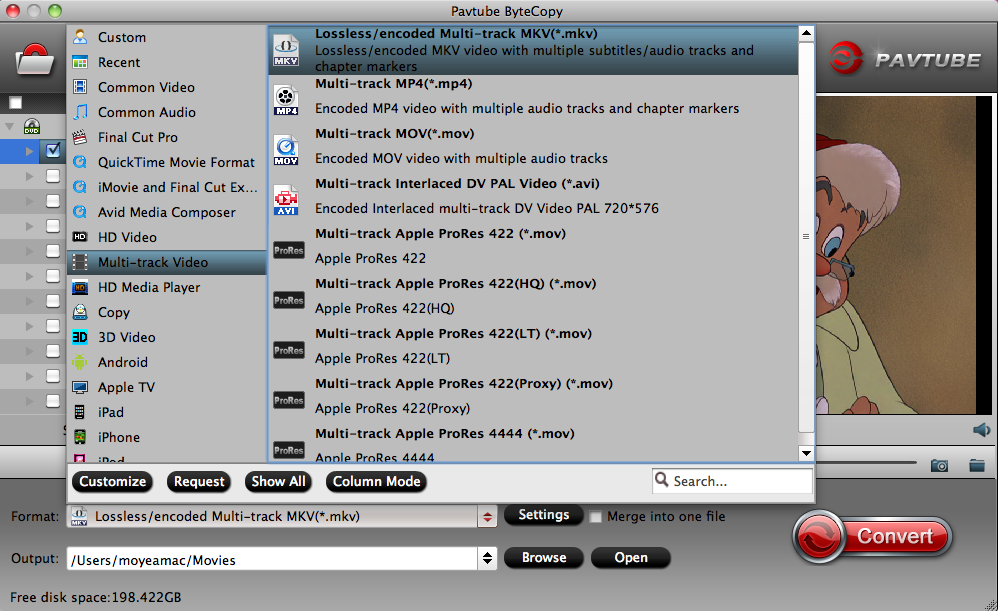
3: Lossless Multi-track MKV: Click the format drop-down box to choose the "Multi-track Video > Lossless/encoded multi-track MKV(*.mkv)". It can 1:1 backup original DVD to computer hard drive with all languages, subtitle tracks and chapter markers. 

Step 3: Convert. After selecting a backup method suitable to your needs, you can click the big "Convert". When the conversion completes, you can play your DVD movies on your computer. And you can transfer them to other devices, or play in the home theater. 

How to transfer Files Between Your Phone and a Computer 

More features of Pavtube ByteCopy 

How to Play DVD movies on Mac OS X 10.9 Mavericks: This is guide for Mac user. 

Extract .Srt Subtitles From Blu-Ray Disc/BDMV/BD ISO: Another function of pavtube ByteCopy: Add Subtitles. 

Watch Blu-ray 3D film on 3D TV with SBS MP4 format: This is an guide for 3D Blu-ray film. 


Tuesday, May 13, 2014

This Week on Blu-ray: May 13-20

May 13, 2014 (New Release) 

Her 

Newly separated from his wife Catherine, Theodore Twombly works for a company that composes love letters for those who lack the creativity to pen their own. Growing more and more isolated from the outside world, his curiosity is piqued by a campaign advertising the latest artificially intelligent operating system. When he is first introduced to his new technological assistant Samantha, he is surprised by her ever-growing emotionality, and her fresh way of looking at the world. As time passes, Theodore finds himself connecting with Samantha in ways he could never have imagined.... 

Movie appeal: Drama, Romance, Sci-Fi 

Video 

  • Codec: MPEG-4 AVC 
  • Resolution: 1080p 
  • Aspect ratio: 1.85:1 
  • Original aspect ratio: 1.85:1

Audio 
  • English: DTS-HD Master Audio 5.1 
  • French: Dolby Digital 5.1 
  • Spanish: Dolby Digital 5.1

Subtitles: English SDH, French, Spanish 

Discs: 50GB Blu-ray Disc, Two-disc set (1 BD, 1 DVD), UV, digital copy, Digital copy, DVD copy 

Packaging: Slipcover in original pressing 

Playback: Region free 

Special ID 

Zi Long has been an infiltrating cop in Xiong Hong Kong mafia clan for many years. The failure of his recent negotiation on behalf of Xiong with the other three local clans makes Xiong suspicious of Zi Long identity. Xiong sets to wipe out every undercover in his gang. Sensing the danger, Zi Long requests an end to his undercover career from his supervisor Sir Zhang. However, Zhang sends Zi Long to Mainland China to infiltrate a business of pecial Identity? trading instead. The business is run by Xiong best prot? Sunny who was Zi Long previous buddy in the gang. Zhang promises to reinstate Zi Long Police identity in conclusion of the mission once Sunny business is broken down. Zi Long agrees, joining local Police Officer Lei Peng and Fang Jing in the force. 

Movie appeal: Action, Foreign, Thriller, Crime, Martial arts 

Video 

  • Codec: MPEG-4 AVC 
  • Resolution: 1080p 
  • Aspect ratio: 2.34:1 
  • Original aspect ratio: 2.39:1

Audio 
  • English: DTS-HD Master Audio 5.1 
  • English: Dolby Digital 2.0 
  • Cantonese: DTS-HD Master Audio 5.1 
  • Cantonese: Dolby Digital 2.0

Subtitles: English 

Discs: 50GB Blu-ray Disc, Single disc (1 BD) 

Packaging: Slipcover in original pressing 

Playback: Region A (B, C untested) 

Ocean's Trilogy Collection 


Jackpot! Danny Ocean and his elite crew of tricksters and thieves are back to back to back in all 3 of the sleek thrillers directed by Oscar-winner Steven Soderbergh. 

Ocean's Eleven kicks off the fun with a daring Las Vegas heist. The team goes global to European glamour spots in Twelve. And Thirteen has the group reuniting in Vegas for a dazzling scheme of payback against a double-crossing casino kingpin. 

Movie appeal: Crime, Comedy, Heist 

Video 

  • Codec: VC-1 
  • Resolution: 1080p 
  • Aspect ratio: see individual releases 
  • Original aspect ratio: see individual releases

Audio 
  • English: Dolby Digital 5.1 
  • French: Dolby Digital 5.1 
  • Spanish: Dolby Digital 5.1 
  • German: Dolby Digital 5.1 
  • Italian: Dolby Digital 5.1 
  • Japanese: Dolby Digital 5.1

Subtitles: English, English SDH, French, Spanish, Portuguese, Japanese, German, Danish, Dutch, Finnish, Italian, Norwegian, Swedish 

Discs: 50GB Blu-ray Disc, Four-disc set (4 BDs) 

Packaging: Slipcover in original pressing 
Figure/replica/props/memorabilia included 

Playback: Region A (B, C untested) 

Stranger by the Lake 

Summertime. A cruising spot for men, tucked away on the shores of a lake. Franck falls in love with Michel. An attractive, potent and lethally dangerous man. Franck knows this, but wants to live out his passion anyway. 

Movie appeal: Foreign, Psychological thriller, Drama, Thriller , Crime 

Video 

  • Codec: MPEG-4 AVC 
  • Resolution: 1080p 
  • Aspect ratio: 2.39:1 
  • Original aspect ratio: 2.39:1

Audio 

  • French: Dolby Digital 5.1 
  • French: Dolby Digital 2.0 

Subtitles: English 

Discs: 50GB Blu-ray Disc, Single disc (1 BD) 

Playback: Region A (B, C untested) 

Know more about This Week on Blu-ray

Google Maps updated in the UK with new public transit data


Google has updated its Google Maps app in Great Britain adding in directions for travel using public transportation. The app update is available now for iOS and Android, as well as on the web on the desktop, will cover almost 17,000 routes of bus, train, tram, and ferry navigation.

The update will work on travel across England, Wales, and Scotland, with Northern Ireland still in the works. The update includes travel information from Traveline and National Express.

Users can now plan their routes to determine what the fastest or shortest routes will be, how many stops or interchanges they want to make, and what time the next departures leave.

"You'll now know when the next trip is departing, how many stops and how far your walk is between each station," product manager David Tattersall told Pocket-lint in an interview. "You can also pick your preferred method of travel and whether you'd rather walk less or make fewer transfers, so you can compare and choose the best option for you."

How to Put DVD Videos onto YouTube for Sharing

As the biggest and the most popular video sharing website, people can upload their favorite videos to share with friends and family, and we can also watch our favorite, most hit movies, but also can listen to beautiful music. So it impressed us in the visual and auditory as one of our favorite platform. YouTube has gained a lot of people's favor with an incredible speed. And also YouTube supports a wide range of file formats like MOV, MP4, AVI, WMV, FLV, 3GP, WebM, MPEG4, etc. but DVD of VOB format is not included. So if you want to put DVD (both commercial DVD and homemade DVD) clips to YouTube, you need to convert DVD to YouTube friendly file format.


To successfully complete the task, a DVD converting program is essential. Some freeware like Handbrake can do such a job as long as the DVD is not encrypted. And as we know that YouTube only supports uploading videos within 15 minutes and no more than 2GB, so here comes another limitation of Handbrake: it doesn't have the editing function to edit DVD to meet the uploading requirements. Considering this, you may want a more professional DVD converter, which can convert DVD to VOB format and other formats that supported by Youtube, and it can handle a wide variety of video and DVD disc including protected by various coding, the most important thing is that it should have editing functions, the ability to edit our video to meet the Youtube requirements. There is a lot of DVD converting program able to meet the above requirements, but can best do them, of course, is Pavtube DVDAid. Learn more about this software ....

Here is the easy-to-use guide:

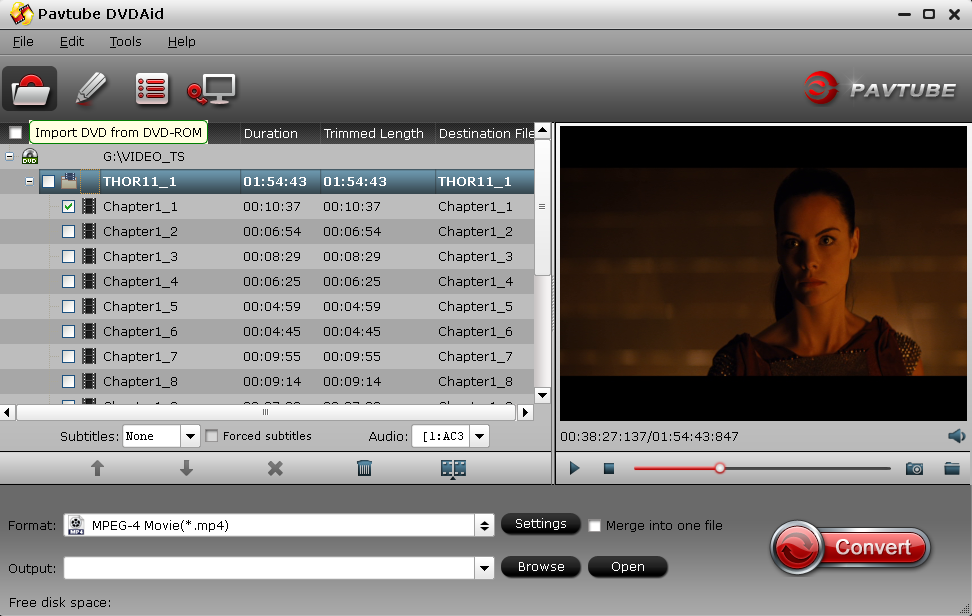
Step 1: Directly download Pavtube DVDAid from here. Install and drive it.

Step 2: Click "Folder button" after placing the DVD disc into DVD-ROM to load DVD files.


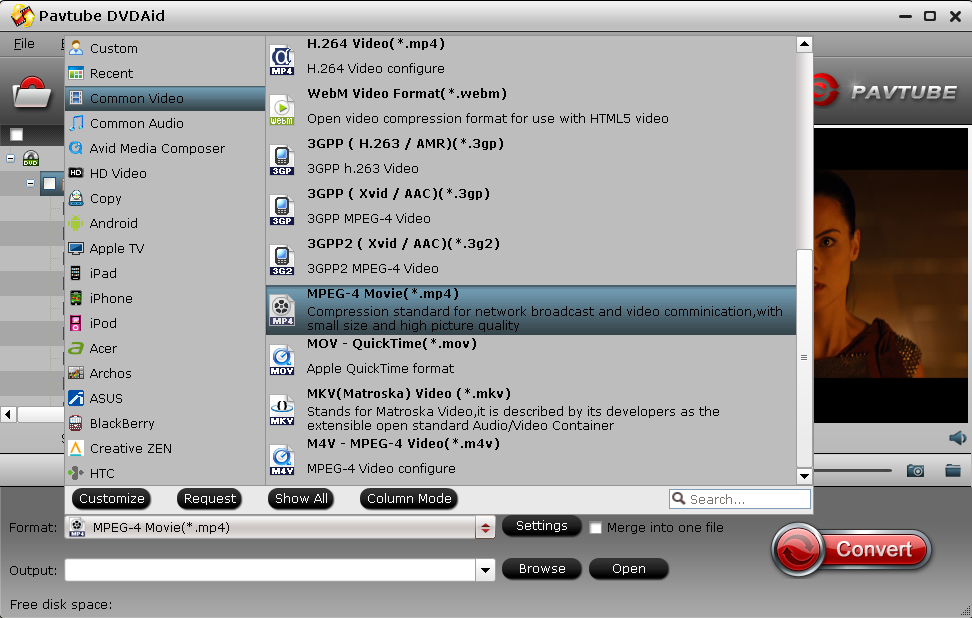
Step 3: Extend the pull-down menu Formate, and then find the "Common Video" and select "MPEG-4 Movie(*.mp4)" as output format. MP4 is the widely used network video streaming media format with smaller size and high picture quality. If you are an experienced user, you can press the Setting button to adjust the resolution, video bitrate, frame rate, etc. to reach a balance between the video size and quality.


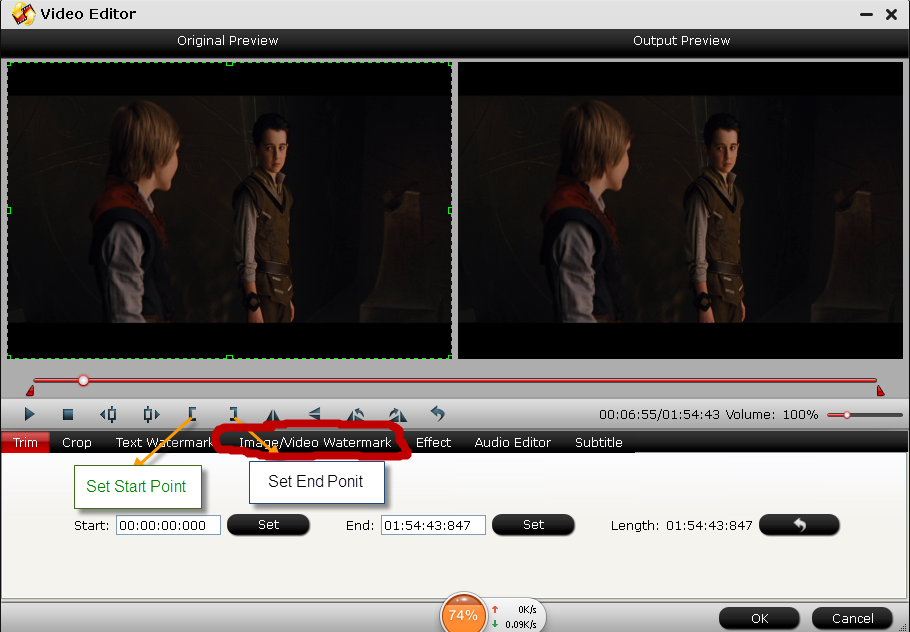
Step 4: Before conversion, we should specially mention the editing function as YouTube has the special requirement of video duration and size.

Hit on "Edit" icon to trim video length. You have two options: input the start time and end time you want to clip into the boxes. Or simply move the sliders on the slide bar to set the start and end point of the clipped part. Then click OK to save the change.


You also can crop the black border, add text/image watermark, and adjust the brightness, contrast, saturation, hue and volume to make a unique video of your own features.

Step 5: When you are satisfied with all the settings, hit "Convert" button to start converting DVD to YouTube. When done, you feel free to upload the converted DVD video to YouTube. Easy, isn't it?

How to upload videos to YouTube?

Step 1: Go to YouTube
Step 2: Login your account and click the "Upload". If you have no account, you can register one.
Step 3: Fill related information about the video you uploaded. The more information you fill, the easier it is to find your video for users.
Step 4: Click the yellow button "Upload" to start uploading your video.

Once the video is published, you can browse the video or share it with friends with the URL YouTube provided at random

More Articles

Backup Existing DVD to NAS server for movie enjoyment

Store DVD Collection on Cloud Storage and Share with Family

Copy DVD disc to any formats supported by many devices


New On DVD This Week, May 12, 2014~May 18, 2014

Her (2013) 


Spike Jonze takes the helm for this comedy about a withdrawn writer (Joaquin Phoenix) who falls in love with his computer's highly advanced operating system. 

Run Time (in minutes): 126 minutes. 
Movie appeal: Drama, Romance, Science Fiction & Fantasy, Special Interest 
Directed By: Spike Jonze 
Written By: Spike Jonze 
In Theaters: Jan 10, 2014 Wide 
On DVD:: May 13, 2014 
Box Office:: $25.6M 

Generation Iron (2013) 


Directed and Written by Vlad Yudin, GENERATION IRON is produced by Yudin and Edwin Mejia. Jerome Gary, producer of the cult classic PUMPING IRON, which helped make Arnold Schwarzenegger a household name, was also tapped to executive produce. GENERATION IRON provides insight into the professional sport of bodybuilding today and follows these men as they compete on the International stage. Yudin followed seven current athletes from around the world, including New York, Los Angeles, Japan, and Germany. 

Run Time (in minutes): 107 minutes. 
Movie appeal: Documentary, Drama, Sports & Fitness, Special Interest 
Directed By: Vlad Yudin 
In Theaters: Sep 20, 2013 Limited 
On DVD:: May 13, 2014 
Box Office:: $0.7M 

Stranger by the Lake (2014) 


Frank (Pierre Deladonchamps) spends his summer days hopelessly searching for companionship at a popular cruising spot on the shores of a lake in rural France. One day, he meets Michel (Christophe Paou), an attractive yet darkly mysterious man and falls blindly in love. When a death occurs, Frank and Michel become the primary suspects but they choose to ignore the dangers and instead continue to engage in their passionate and potentially lethal relationship. STRANGER BY THE LAKE is an erotic thriller that tests the lengths and limits of sexual desire. 

Run Time (in minutes): 97 minutes. 
Movie appeal: Mystery & Suspense, Drama 
Directed By: Alain Guiraudie 
Written By: Alain Guiraudie 
In Theaters: Jan 24, 2014 Limited 
On DVD:: May 13, 2014 
Box Office:: $0.3M

Monday, May 12, 2014

Movies Coming Soon: May 12, 2014~May 18, 2014

Godzilla (2014) 

In Summer 2014, the world's most revered monster is reborn as Warner Bros. Pictures and Legendary Pictures unleash the epic action adventure "Godzilla." From visionary new director Gareth Edwards ("Monsters") comes a powerful story of human courage and reconciliation in the face of titanic forces of nature, when the awe-inspiring Godzilla rises to restore balance as humanity stands defenseless. 

Run Time (in minutes): 123 minutes. 
Movie appeal: Mystery & Suspense, Science Fiction & Fantasy 
Directed By: Gareth Edwards , Keith Melton 
Written By: Max Borenstein, Frank Darabont, Dave Callaham 
In Theaters: May 16, 2014 Wide 
Cast: Aaron Taylor-Johnson, Elizabeth Olsen, David Strathairn, Ken Watanabe, Juliette Binoche 

The Immigrant (2014) 

In James Gray's THE IMMIGRANT, Ewa Cybulski (Marion Cotillard) and her sister sail to New York from their native Poland in search of a new start and the American dream. When they reach Ellis Island, doctors discover that Magda (Angela Sarafyan) is ill, and the two women are separated. Ewa is released onto the mean streets of Manhattan while her sister is quarantined. Alone, with nowhere to turn and desperate to reunite with Magda, Ewa quickly falls prey to Bruno (Joaquin Phoenix), a charming but wicked man who takes her in and forces her into prostitution. The arrival of Orlando (Jeremy Renner) - a dashing stage magician who is also Bruno's cousin - restores her self-belief and hopes for a brighter future, becoming her only chance to escape the nightmare in which she finds herself. 

Run Time (in minutes): 120 minutes. 
Movie appeal: Drama, Romance 
Directed By: James Gray 
Written By: James Gray, Ric Menello 
In Theaters: May 16, 2014 Limited 
Cast: Marion Cotillard Ewa Cybulski, Joaquin Phoenix Bruno Weiss, Jeremy Renner Orlando, Orlando, Angela Sarafyan Magda, Magda Cybulsk 

Chinese Puzzle (2014) 

A 40-year-old father of two, still finds life very complicated. When the mother of his children moves to New York, he can't bear them growing up far away from him and so he decides to move there as well. 

Run Time (in minutes): 117 minutes. 
Movie appeal: Drama, Romance, Comedy 
Directed By: Cédric Klapisch 
Written By: Cédric Klapisch 
In Theaters: May 16, 2014 Limited 
Cast: Romain Duris Xavier, Kelly Reilly Wendy, Audrey Tautou Martine, Sandrine Holt Ju, Margaux Mansart Mia 


How to Play DVD movies on Mac OS X 10.9 Mavericks

Sumarry: Playing and watching movies in DVD discs in Mac OS X Mavericks system can be such an easy feat, especially if you have all the tools and software necessary for the job. This article offers two ways for you!


On June 10, 2013, Apple announced version desktop operation system, Mac OS X 10.9 Mavericks, and was released on October 22, 2013, with 200 new features. Even so, it has been arrived for free download and update. May be you have tried play DVD on Mavericks with its built-in media player, but when you insert your DVD on your Mac computer and nothing takes place. The next thing is to open your media player and nothing happens. So it could be necessary to find an alternative.

Method One:

Preparations:
  • A Mac computer
  • An external or internal DVD drive compatible with your computer
  • On the hand, you must have a FireWire or a USB 2.0 connection, especially if you are using external DVD

Since DVDs are not supported by some media players, for example iTunes, QuickTime, etc. If we want to play DVD on Mac with any media player with ease, we can rip DVD to MOV or other popular video formats that are supported by Mac apps. So this is a second method.

Method Two:

Preparations:
  • A Mac computer
  • A software that can play a role as DVD players in Mavericks system-Pavtube ButyCopy for Mac

Step 1. Add DVD files 


Insert DVD to your Mac. Launch the Pavtube ByteCopy for Mac; drag and drop DVD icons which has appeared on the desktop to the app. Or you can click disc icon to load DVD movies. 

Step 2. Select any ideal output format or device profile for different uses.


Now you can choose Mac-compatible format, such as MOV or MP4, as the output format for the target videos in the format drop-down list. 

If you want to watch these videos on devices, like iPad or iPhone, regularly, you can choose the corresponding devices as the output video format. 

Tip: Pavtube ByteCopy for Mac is also support multi-track MKV, MOV, MP4, Apple ProRes MOV solution. It can backup DVD movies to lossess BD/DVD to MKV with all languages and subtitles.


Step 3. Convert DVD to Mac 

Press the Convert button on the main interface to accomplish the DVD to Mac conversion. After the video conversion, you can freely play DVD videos on Mac and even share with other media devices.

More Article:

Add and convert DVD VOB movies to Galaxy Tab 3 playable mp4 format

Transfer HD Videos and Movies to SamSung Galaxy NotePro 12.2 (Blu-ray, DVD, Video)

MakeMKV vs ByteCopy vs DVDfab - Top Blu-ray Ripper/Backup Review